
Control Center for Mac · Beginner guide
Build your first app or website.
Start with one sentence about someone you want to help. Suppose your walking club keeps losing signal on the same trail. What would you like their phones to do when the map goes blank?
Decide what to build first
In a new workspace, choose Create a venture. Give it a name, like “Walking Club Trails”, and enter your sentence in the One-liner field. Choose Create only to save the idea. Control Center can create the project folder on your Mac.
-
Choose what the first hiker needs
A planning interview helps you narrow the idea. When can the hiker save the map? What will they need to see without signal? Pick the essentials for one walk. Route sharing and club rankings can wait.
-
Give the agent one change to build
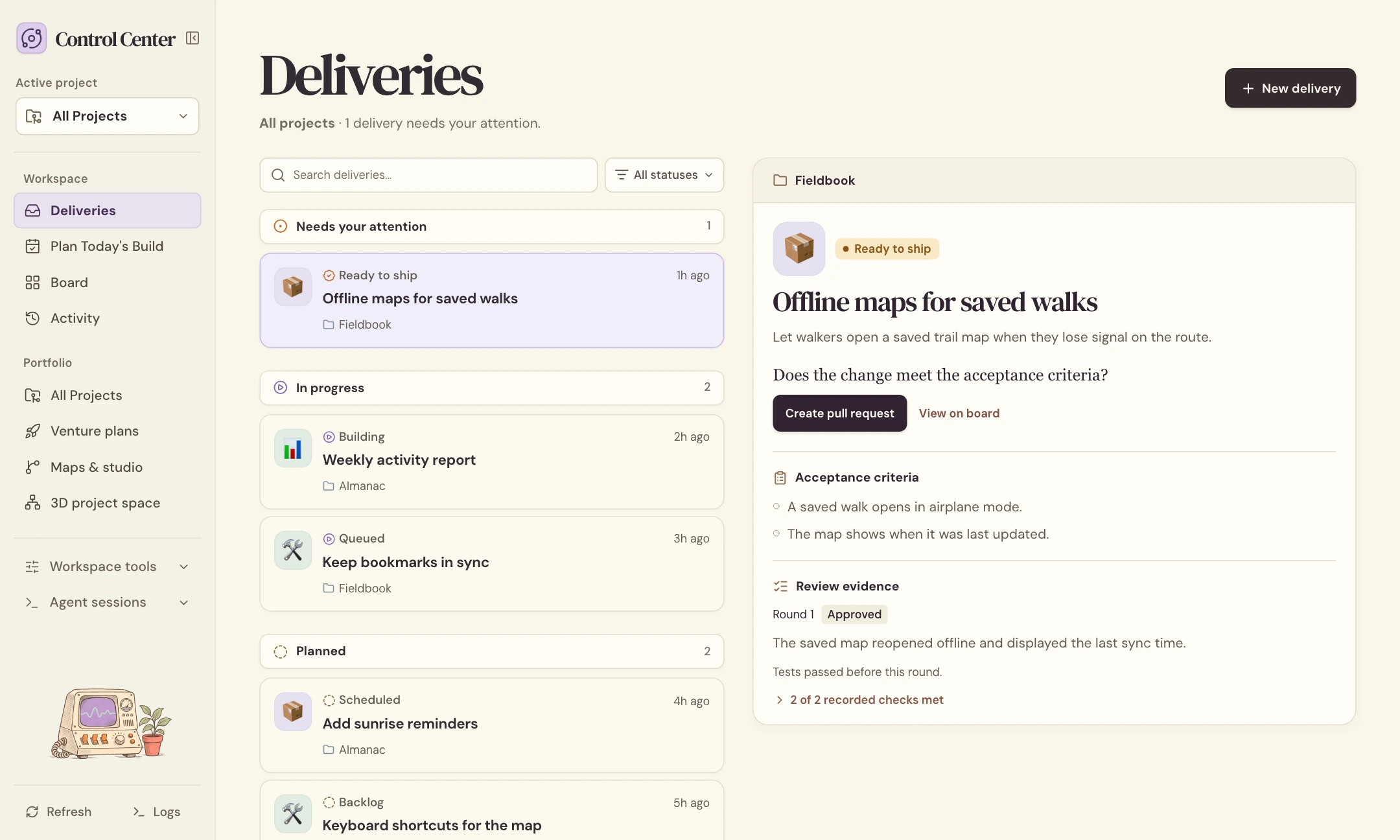
Control Center calls a piece of work a delivery. Name this one “Open a saved map offline”. Write down how you’ll tell it works. The map should reopen in airplane mode and show when it was last updated. When you start the build, your coding agent writes the change in a separate copy of the project.
-
Try the walk before you share it
Open the delivery to read what the agent changed and which checks ran. Then try it on a phone. Save the trail, switch on airplane mode, close the app and reopen it. If the map is blank, describe what happened and ask for a fix. You decide when it’s ready for the club.
Put it in a hiker’s hands
Your first release can be small. A weekend walk with a handful of club members can tell you whether the map solves the problem you started with.
-
Invite your first walkers
For a trail website, publish the reviewed version with your web host. Send the link to five club members before Saturday’s walk. Ask each person to save a trail at home and tell you whether they could open it when the signal dropped.
-
Find out where hikers get stuck
Count how many of the five saved a map and how many could reopen it offline. Ask the people who got stuck to show you where. As more hikers join, you can add those actions to PostHog, an analytics tool, to see how often people complete them.
-
Turn a bad walk into the next fix
If two hikers report blank maps, add a bug with the steps they took and the phone they used. Connected PostHog error reports can also bring bugs into Control Center. Give the agent the failing example, try those steps on the fixed version, then ask the same hikers to try it again.
Set up your Mac
Control Center is in private alpha for Apple silicon Macs.
Check Mac alpha availabilityOpen your workspace
When you have the installer, open the disk image, drag Control Center into Applications and open it. Choose Explore without an agent if you’d like to write your idea first.
Connect the account you already use
A coding agent is the program that reads your instructions and works on your project. Use a Claude subscription that includes Claude Code or a ChatGPT subscription that includes Codex. Workspace tools → Agent setup shows how to install the program and sign in to your account on this Mac.
Try the connection
After signing in, choose Refresh status, then Test connection. This sends one short request to your provider. Save the agent you want to use for builds. Your provider’s normal usage limits apply.